PDF Tracking: See Whether and How Your PDF Is Read
Most PDFs vanish into inboxes without a trace. PDF tracking shows whether your document is opened, which pages are read and what readers click – here’s what you can measure and how to do it without tracking cookies.

You sent the proposal, published the magazine, shared the annual report – and then? Silence. Was the PDF opened? Which pages were read, and where did readers stop? For most documents, nobody knows, because a PDF file can’t report back once it has left your hands.
PDF tracking changes that. In this article, you’ll learn what you can measure about a PDF, why an email attachment tells you nothing, and how Viewnamic shows you how your documents are read – without tracking cookies and without profiles of your readers.
What PDF tracking means
PDF tracking measures how a document is used once it’s online: how often it is opened, how long it is read, which pages get attention and what readers click. It works on two levels:
- Statistics for publications with many readers – magazines, catalogues, reports, brochures. Here you want to know how the document performs, not who the readers are.
- Personal insight for a few named recipients – a proposal or a contract draft. Here it helps to know whether the person you sent it to has opened it.
Why an email attachment tells you nothing
An attached PDF is a copy. Once sent, it lives on the recipient’s computer, gets forwarded or forgotten – and never reports back. Read receipts can be declined and only say that an email was opened, not the attachment. And every correction means a new file that has to be sent again.
As soon as you share a link to the PDF instead of the file, you get both: the document stays up to date in one place, and you can see how it is used.
What Viewnamic measures
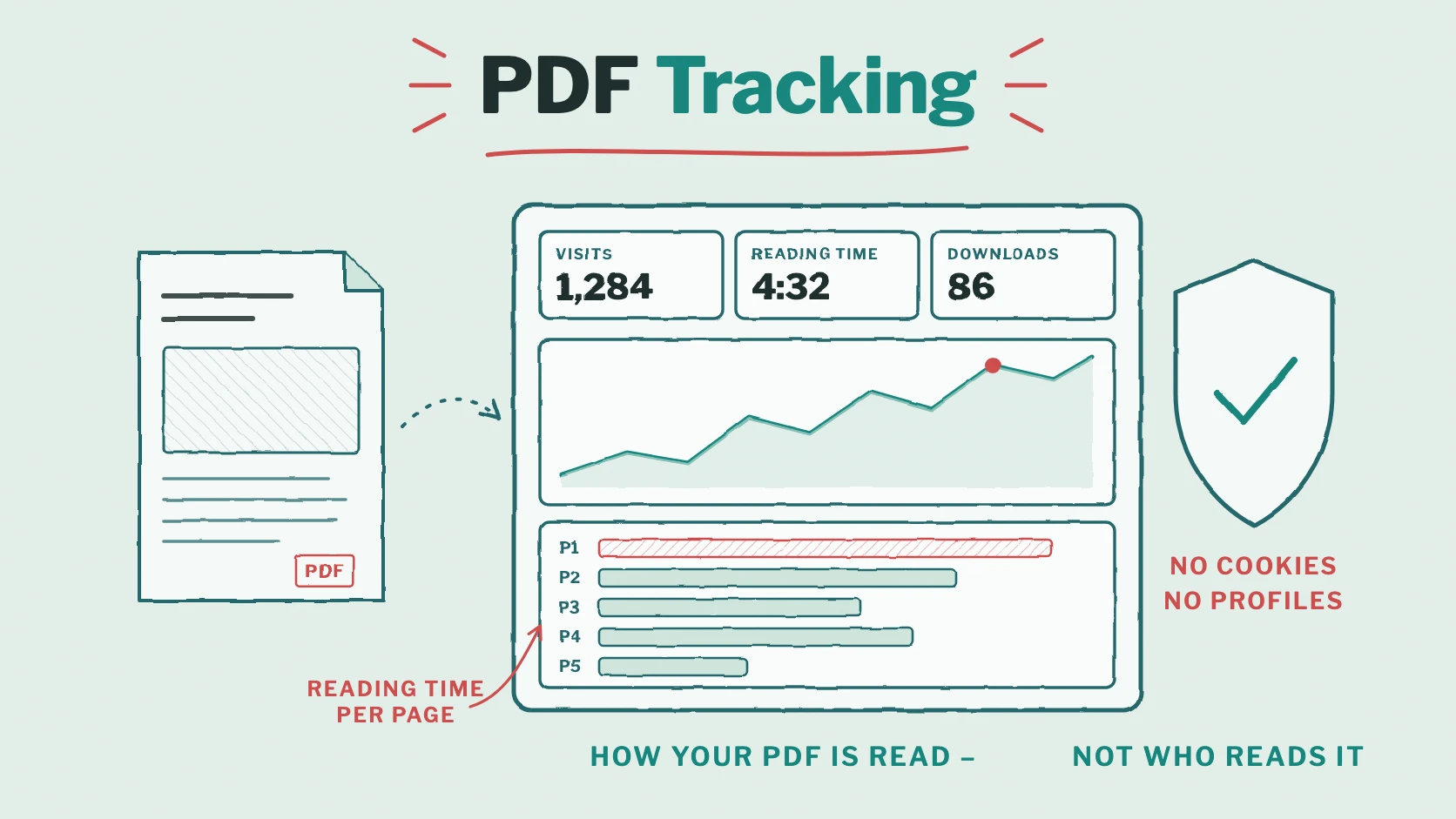
With the statistics of the Premium and Tailored plans, you see for each publication:
- Visits: how often the PDF was opened – through its link, a secure link or an embed on a website.
- Average active reading time: only active time counts. A tab in the background doesn’t inflate the figure.
- Reading time per page: for every page, how many visits read it and for how long. The bars show at a glance which pages are read longest. Magazines are counted by double page.
- Downloads, if your plan allows readers to download the PDF.
- Interactive content: how often videos were started, audio files played, 3D models, slideshows and click dummies opened and links clicked.
- Visits over time as a chart – for 7, 30, 90 or 365 days or the whole period.
Your public page has statistics of its own: visits, how often your publications were shown and how often they were opened.
Privacy built in
Viewnamic measures how your publications are read – not who reads them:
- no cookies, and nothing is stored in the reader’s browser for statistics;
- no IP addresses in the statistics, no location;
- every visit gets a new identifier, so no reader profiles are built up;
- browsers that send Do Not Track or Global Privacy Control are not counted at all;
- the data is stored in Germany and deleted automatically after 12 months.
That’s why Viewnamic shows your readers no cookie banner – and you still see what works. Details are in Reader statistics and privacy.
Personal insight for proposals: secure links
For confidential documents, Viewnamic offers Secure sharing: every recipient gets a personal link and confirms their email address with a one-time code before the PDF opens. For each recipient, you see when the PDF was opened for the first and the last time and how often – and you get an email when it’s opened. A watermark and an expiry date are optional, and you can revoke any link at any time. The recipient knows that the link is personal, and a forwarded link is useless without access to their mailbox. Secure sharing is part of the tailored plans; more in Share a PDF securely.
How to use the figures
- Sales: check before the follow-up call which pages of your sales folder were read longest – they show what interests the prospect.
- Marketing: link clicks show which offers work; compare two versions of a brochure over the same period.
- Publishers: show advertisers how often their pages and videos were seen, and plan the next issue around the topics that were read longest.
- Reports and training material: the reading time per page shows whether readers reach the end – or where they stop.
- Better documents: pages that are skipped quickly can be shortened, videos that are rarely started can be placed better.
Frequently asked questions
Can I see who read my PDF?
For public and link-only publications, no – readers stay anonymous, and that’s intentional. For named recipients, use secure links: there you see, for each recipient, when they opened the PDF.
Do my own visits count?
Yes, your own visits count like any reader’s. The preview in the embed window and the live examples on the Viewnamic website are not counted.
Which plans include statistics?
Premium and the tailored plans. See Pricing, or talk to us about a tailored plan with secure sharing.
Conclusion: know what happens after you hit “send”
A PDF doesn’t have to disappear into an inbox. Shared as a link with Viewnamic, it tells you how often it is opened, which pages are read and what readers use – privacy-friendly, without cookies. And for the proposals that matter most, secure links show you when your recipient opened them.
Ready to see how your documents are read? Compare the plans or try Viewnamic without an account.
Publish your PDFs with Viewnamic
Host, share and enhance your documents – with the Free plan, online for 30 days.