How to Create an Interactive Website Experience Without Building a Website
Creating a website can be complicated, especially without coding or web design experience. Learn how Viewnamic transforms PDFs into interactive online experiences with videos and dynamic content, without needing WordPress, Webflow, Wix, or hosting setup.

Get to know the best website alternative: interactive PDFs with Viewnamic
Creating a professional online presence usually means building a website. That often leads to complicated tools, hosting issues, plugins, responsive design problems, and endless tutorials about WordPress, Wix, Webflow, or coding. Even no code tools like Lovable still require a basic technical understanding of how to host your website.
But what if you already know how to create a PDF?
With Viewnamic, you can upload your PDF, add videos or interactive content, and instantly turn your document into a shareable online experience. No website builder. No coding. No publishing headaches.
Instead of learning how to build and host a website, you simply work with a format you already know: PDFs.
For many people, that is significantly faster, easier, and more intuitive.
What Is Viewnamic?
Viewnamic is a platform that lets you upload PDFs and enrich them with dynamic content such as:
• Videos
• 3D models
• Interactive elements
• Clickable overlays
• Embedded media
After uploading your document, you receive a link that you can share online. Your PDF becomes an interactive digital document that behaves almost like a lightweight website or landing page.
This creates a completely different workflow compared to traditional website builders.
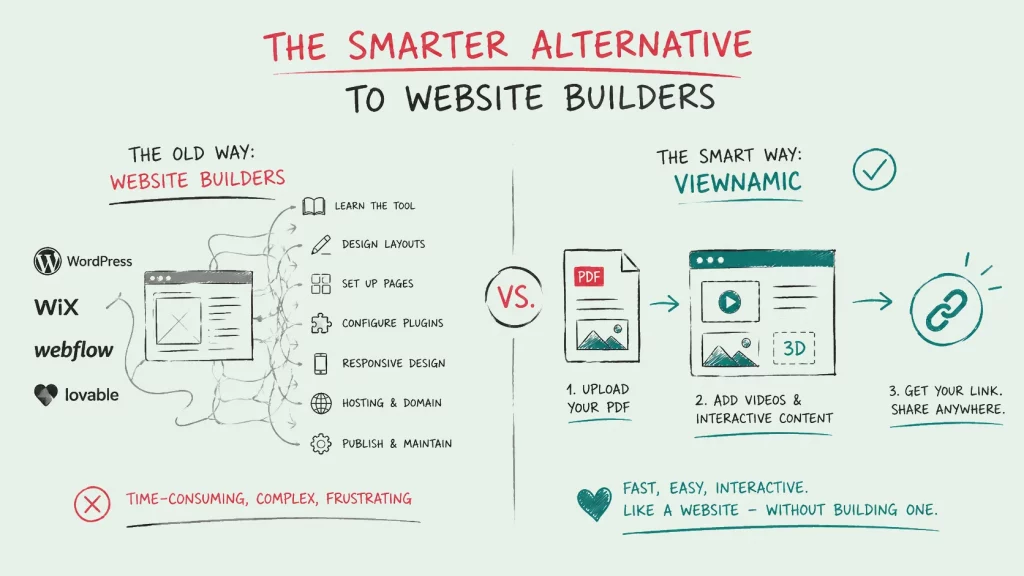
Instead of:
- Designing a website
- Learning a website builder
- Configuring hosting
- Publishing online
- Managing responsiveness and layouts
You can simply:
- Create a PDF
- Upload it to Viewnamic
- Add interactive content
- Share the link
That simplicity is the core advantage.
Why PDFs Are Still One of the Best Content Formats
PDFs are everywhere because they are easy to create and easy to share.
Millions of people already know how to use tools like:
• Microsoft PowerPoint
• Adobe InDesign
• Canva
• Figma
• Microsoft Word
Most professionals can design a decent looking PDF much faster than they can build a website.
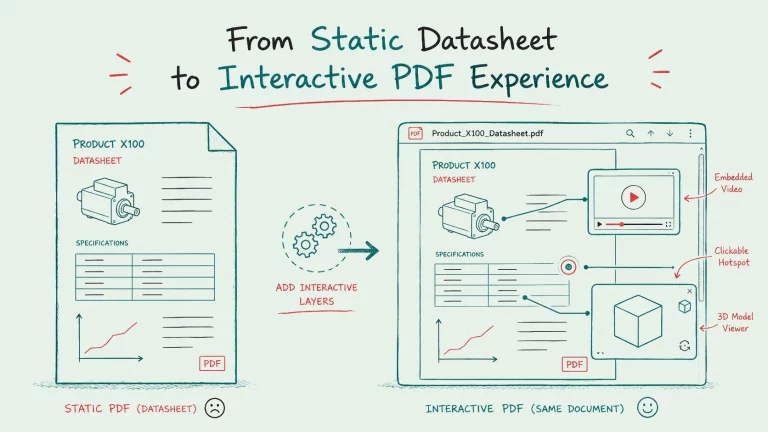
The problem is that PDFs traditionally feel static.
That is where Viewnamic changes the experience.
With interactive overlays and embedded media, a PDF can suddenly become:
• More engaging
• More visual
• More dynamic
• Easier to understand
• Better for storytelling
You keep the simplicity of a document while gaining many benefits typically associated with websites.
A Website Alternative for Non Developers
(Truly) No Coding Required
One of the biggest barriers to creating a website is technical knowledge.
Many people today try to solve this with AI tools or so called “vibe coding.” But even if AI generates the code, users still run into questions like:
• How do I host this?
• How do I publish it online?
• Why does it only work on localhost?
• How do I connect a domain?
• How do I make it responsive?
For non technical users, this quickly becomes frustrating.
Viewnamic removes this complexity entirely.
You do not need:
• HTML knowledge
• CSS knowledge
• JavaScript knowledge
• WordPress experience
• Webflow experience
• Wix experience
• Hosting infrastructure
You simply upload your document and share the generated link.
Focus on Content Instead of Infrastructure
Many creators do not actually want to build websites. They simply want to present information online in a professional way.
Viewnamic allows you to focus on:
• Design
• Content
• Storytelling
• Visual presentation
Instead of dealing with technical infrastructure.
Use Cases for Interactive PDF Websites
Interactive Portfolios
Portfolios are one of the strongest use cases for Viewnamic.
Designers, architects, videographers, photographers, and creatives often already create portfolio PDFs. With Viewnamic, those portfolios can become far more immersive.
Examples of Interactive Portfolio Features
• Embedded showreels directly inside the portfolio
• Before and after sliders
• Interactive product showcases
• 3D model presentations
• Motion graphics inside project pages
Instead of sending a static PDF attachment, you can share a modern interactive portfolio link.
That creates a more memorable impression while still keeping the simplicity of document based workflows.
Sales and Product Presentations
Sales teams frequently use PDFs for presentations, brochures, and sales folders.
With Viewnamic, these materials can become interactive sales experiences.
Benefits for Sales Teams
• Product videos directly inside the document
• Interactive demos
• Embedded explainer animations
• More engaging customer presentations
• Shareable online links instead of email attachments
This is especially useful for companies that want visually rich presentations without investing time into building dedicated landing pages for every campaign.
Real Estate Exposés
Real estate documents often contain static images and text. Interactive PDFs can make exposés significantly more engaging.
Possible Interactive Elements
• Video walkthroughs
• 360 degree tours
• Embedded drone footage
This creates a more premium presentation experience for buyers and investors.
Resumes and Applications
Traditional resumes are limited.
Interactive resumes can include:
• Personal introduction videos
• Portfolio previews
• Project demonstrations
• Interactive references
• Product showcases
This helps applicants stand out while still using a familiar PDF based format.
Educational Materials and Presentations
Teachers, trainers, and educators can also benefit from interactive documents.
Examples include:
• Embedded tutorial videos
• Interactive learning content
• Animated explanations
• Linked exercises
• Multimedia course documents
Instead of sending multiple files and links, everything can live inside one shareable experience.
Why This Approach Is Different From Traditional Website Builders
Faster Creation Process
Traditional websites often require:
• Layout setup
• Navigation systems
• Hosting
• Mobile optimization
• CMS configuration
• Plugin management
With Viewnamic, much of this complexity disappears because the PDF already defines the structure and layout.
That makes the creation process dramatically faster for many use cases.
Easier for Existing Workflows
Many businesses already work heavily with PDFs.
Instead of changing internal processes completely, Viewnamic extends existing workflows with interactive functionality.
Teams can continue using familiar design tools while adding digital experiences on top.
More Natural Reading Experience
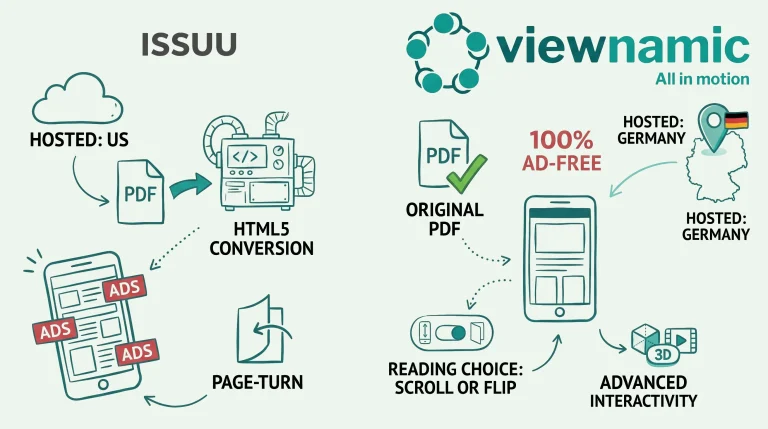
Unlike many flipbook solutions, Viewnamic focuses on preserving a natural document and scrolling experience.
The PDF remains the foundation while interactive elements enhance the content rather than replacing it.
That creates a cleaner and more intuitive user experience.
Interactive Documents Are Becoming a New Category
There is a growing gap between static documents and fully developed websites.
Interactive PDFs powered by platforms like Viewnamic sit directly in between.
They offer:
• The simplicity of documents
• The engagement of multimedia
• The accessibility of shareable links
• The convenience of online hosting
For many creators and businesses, that combination is exactly what they need.
Not every project requires a fully custom website.
Sometimes a professionally designed interactive document is the faster, smarter, and more practical solution.
Create an Online Experience Without Building a Website
If you already know how to create PDFs, you already have most of the skills needed to publish interactive online experiences.
With Viewnamic, you can transform static documents into dynamic, shareable presentations without coding, hosting setup, or website builder experience.
Whether you are building a portfolio, sales presentation, exposé, resume, or educational document, Viewnamic helps you create something that feels modern and interactive while keeping the workflow simple.
Instead of learning how to build a website, you can focus on presenting your content in the best possible way.
Publish your PDFs with Viewnamic
Host, share and enhance your documents – free for 30 days.