
Traveling is inherently a dynamic, multi-sensory experience. Yet, for decades, the tourism industry has relied on flat, static brochures and standard PDFs to showcase vibrant destinations. If you want to truly capture the essence of a location and engage your audience, you need to upgrade to an interactive travel guide.
Transforming a standard document into a digital experience allows readers to explore a destination before they even pack their bags. In this comprehensive guide, we will explore what makes an interactive travel guide successful, the must-have content you need to include, and why dynamic elements like videos, 3D models, and click dummies are absolute game-changers for your digital publications.
The Core Elements: What is Important for a Modern Travel Guide?
Creating an engaging travel guide goes beyond simply writing about beautiful locations. It requires a thoughtful blend of structure, design, and user experience.
Seamless Navigation and Natural Reading
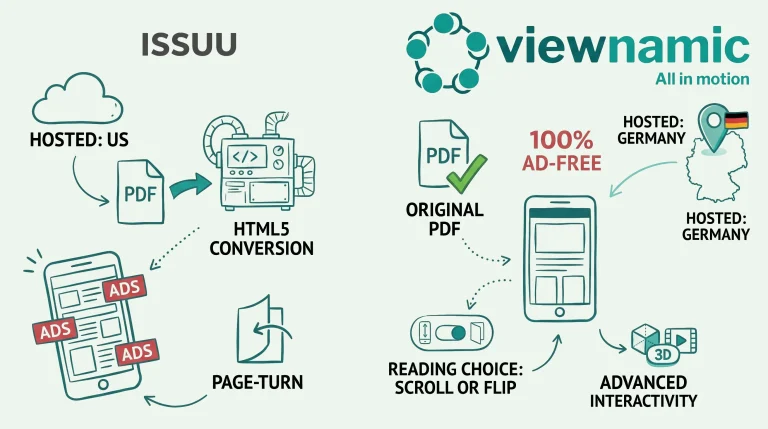
One of the most important aspects of digital reading is the flow. Readers today expect a smooth, natural vertical scrolling experience. Outdated page-flipping effects—often seen in older digital flipbooks—can feel clunky and interrupt the user’s focus. A successful interactive guide embraces modern web standards, allowing users to scroll vertically through the content seamlessly, just as they would on their favorite websites or social media feeds.
Must-Have Content: The Foundation
Before adding the “wow” factor of interactivity, your guide needs a solid foundation of essential content. A well-rounded travel guide must include:
- A Clear Target Audience: Define who the guide is for. For example, noting that a location is the perfect getaway for families and couples seeking tranquility over nightlife sets the right expectations.
- Actionable Pro-Tips: Give readers insider knowledge they cannot easily find elsewhere. This could be recommending the use of a GPS app for unmarked trails, or highlighting that a notoriously strong sangria at a historic defense tower is well worth the slightly steeper price.
- Structured Itineraries: Travelers love example days to help them visualize their trip. Your guide should break down full days with timetables and specific destinations, such as starting a day with a 9:30 AM beach visit, moving to a sunset hike later in the evening, and ending the day back at the car.
- Local Culinary Secrets: Highlight specific, highly recommended food spots, like a traditional family-run restaurant offering an unbeatable Menú del Día for €13.50.
Why Dynamic and Interactive Content is Essential
While beautiful photos and well-written text are necessary, they are no longer enough to keep readers fully engaged. Integrating dynamic content elevates the user experience from passive reading to active exploration.
Bringing Destinations to Life with Videos
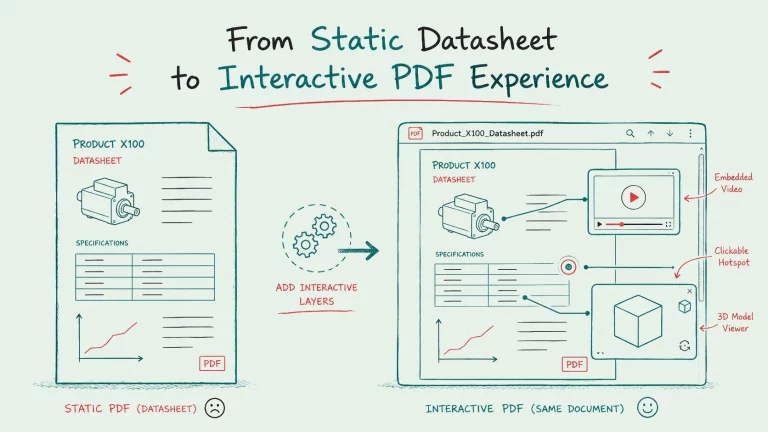
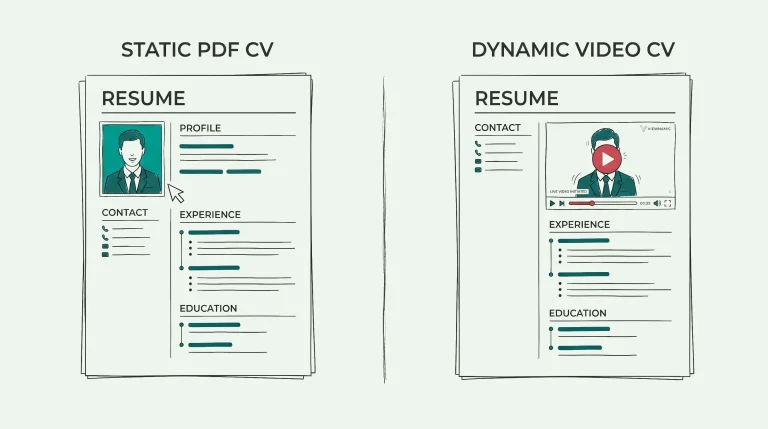
Images show a single frame, but videos capture the atmosphere. Embedding video content directly over your PDF layout allows readers to hear the crashing waves of a hidden cove, see the bustling energy of a local market, or take a sweeping drone tour of a mountain range. Videos keep users on the page longer and build an emotional connection to the destination that static text simply cannot achieve.
Immersive 3D Models
For historical sites, monuments, or even resort layouts, 3D models provide an unparalleled level of detail. Instead of just reading about the architecture of a local Castell, readers can interact with a 3D model right on the page—rotating it, zooming in on specific features, and exploring the structure from every angle. This spatial awareness is incredibly valuable for trip planning.
Deep Dives with Click Dummies
A common problem with traditional travel guides is visual clutter. If you try to cram every detail, map route, and timeline onto a single page, it becomes overwhelming. This is where click dummies (interactive hotspots) shine.
By using click dummies, you can keep your main page clean and visually striking. If a reader wants more information, they simply click an interactive element. For example, you can design a beautiful hiking map with numbered waypoints. When the user clicks on a specific number, a detailed map or an image gallery opens up as an overlay, showing the exact route in more detail between those specific points. This on-demand information delivery ensures your guide remains both beautiful and highly informative.
See It In Action: The Cala Millor Example
To see exactly how these concepts come together, you can reference the Travel_Guide_Cala_Millor.pdf. This guide perfectly demonstrates how a static document can be transformed into a dynamic journey.
Check out the fully interactive version here:
View the Interactive Cala Millor Travel Guide
In this real-world example, you will notice how the guide introduces the top spots around the region, from the expansive sandy beach of Cala Mesquida to the breathtaking, hidden trails of Puig de na Penyal. On the final pages, the guide features structured example days. The included maps utilize click dummies perfectly—readers can click on the numbered markers beside the route to trigger detailed pop-ups, allowing them to explore the journey step-by-step without ever leaving the original document.
The Technological Advantage: Enhancing, Not Altering
When building these interactive guides, the underlying technology matters. The best approach is to use a web-based viewer that places these dynamic elements (videos, 3D models, click dummies) as web elements directly over the PDF.
This method ensures that the original PDF file remains completely unaltered. Your pristine layout, typography, and original design are preserved, while the dynamic content is seamlessly integrated on top. It looks and feels as though the interactive media is a natural part of the document, providing rich analytics on how readers interact with your content without permanently modifying your source file.
Start Your Interactive Journey Today
The era of flat, uninspiring digital documents is over. By combining stunning design, structured itineraries, and rich dynamic content like videos and interactive hotspots, you can provide an unforgettable digital experience for your readers.
Are you ready to transform your static brochures into captivating, revenue-driving digital assets? Start integrating dynamic content into your PDFs today and give your audience the immersive travel experience they deserve.
Last updated:
Publish your PDFs with Viewnamic
Host, share and enhance your documents – free for 30 days.