How to Create a Standout CV: 6 Universal Must-Haves (and One Bold Way to Get Noticed)
Stand out in a crowded job market! Learn the six fundamental elements that every successful CV must include, regardless of the industry. Plus, discover one innovative, wizard-style trick using Viewnamic to make your next application truly unforgettable.

Recruiters and hiring managers look at hundreds of applications every week. Industry studies consistently show that the initial scan of a resume takes just 6 to 7 seconds. In that fleeting window, your CV has one job: convince the reader that you are worth a deeper look.
Learning how to create a good CV isn’t about loading a page with graphic flourishes or listing every single task you’ve performed since high school. It’s about clarity, relevance, and impact.
Whether you are applying for a software engineering role, a creative director position, a sales leadership post, or your very first internship, certain non-negotiable fundamentals apply across the board.
Here is the universal blueprint for a high-performing CV—along with a modern way to make your application truly unforgettable.
The Universal Blueprint: What Every Great CV Needs
No matter the industry, hiring managers look for structured signals that demonstrate competence, reliability, and clear communication. If your document lacks these essentials, even the most impressive career achievements can get lost.
1. Clean, Friction-Free Contact Information
Place your contact details at the very top of your document. Make them effortless to read and verify:
- Full Name & Target Professional Title: (e.g., Alex Morgan | Senior Product Marketing Manager)
- Email & Phone Number: Use a professional email address (avoid outdated handles or funny nicknames).
- Location: City and state or country (e.g., Berlin, Germany). Full street addresses are unnecessary and outdated.
- Relevant Online Links: A polished LinkedIn profile, GitHub profile, or online portfolio link.
2. A Compelling 3-Sentence Professional Summary
Skip the outdated “Objective” statement—recruiters care about what you can bring to their team, not just what you want from them. Instead, open with a sharp professional summary:
- Sentence 1: Who you are and your years of experience.
- Sentence 2: Your core specializations and standout skill set.
- Sentence 3: The primary impact or value you deliver to organizations.
Example: “Data-driven Growth Marketer with 6+ years of experience scaling B2B SaaS platforms. Specialized in organic search acquisition and funnel optimization, having driven over €4M in pipeline revenue. Passionate about turning complex user analytics into actionable acquisition loops.”
3. Impact-Driven Experience (Focus on Outcomes, Not Duties)
The most common mistake job seekers make is writing a list of daily responsibilities. A hiring manager knows what an account manager or a software engineer does on paper; what they want to know is how well you did it.
Use Google’s classic XYZ formula for bullet points: Accomplished [X], as measured by [Y], by doing [Z].
- Instead of: “Responsible for redesigning the company onboarding process.”
- Write: “Streamlined user onboarding by redesigning customer touchpoints, reducing time-to-value by 28% and boosting 30-day retention across 15,000+ accounts.”
Lead every bullet point with strong action verbs: spearheaded, negotiated, consolidated, engineered, audited, or orchestrated.
4. A Tailored, Realistic Skills Section
Group your skills logically so the eye can scan them in a fraction of a second:
- Hard/Technical Skills: Tools, programming languages, software (e.g., Figma, SQL, HubSpot, Python).
- Core Competencies: Methodologies and domains (e.g., Agile Project Management, Revenue Forecasting, A/B Testing).
Avoid rating your skills with subjective graphics like progress bars or star meters. Labeling yourself “4 out of 5 stars in Photoshop” tells a hiring manager nothing concrete and leaves them wondering what the missing fifth star represents.
5. Education, Credentials, and Certifications
Keep your educational background concise and placed toward the bottom (unless you are a recent graduate):
- Degree title, field of study, institution, and graduation year.
- Relevant professional certifications (e.g., PMP, AWS Solutions Architect, Google Analytics Certification).
6. Flawless Typography and Visual Hierarchy
A hiring manager should never struggle to navigate your layout. Stick to clean visual hygiene:
- Length: 1 to 2 pages maximum.
- Typography: Modern, legible typefaces such as Inter, Calibri, Roboto, or Helvetica. Keep body text between 10pt and 11.5pt.
- White Space: Balanced margins (at least 0.5–0.75 inches) so the document feels breathable rather than overcrowded.
- Zero Errors: Always run your CV through a spell-check tool and have a trusted peer review it. A single grammatical slip can signal a lack of attention to detail.
Beyond the Basics: How to Make Your CV Unforgettable
Once you have mastered the fundamentals, you face another challenge: hundreds of qualified candidates submit clean, well-formatted PDFs.
When every resume follows the same layout, how do you make a hiring manager stop scrolling and remember who you are?
The Power of Adding Video to Your Resume
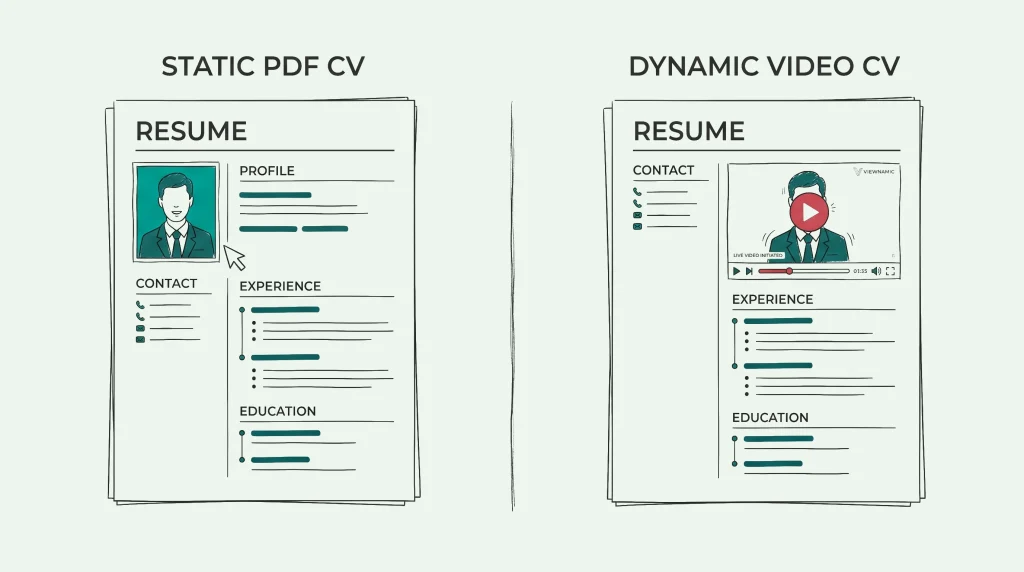
Imagine a recruiter opening your document and seeing a short, high-resolution video embedded seamlessly into your layout.
With sound enabled, you can introduce yourself in 20 to 30 seconds—sharing your passion, demonstrating your verbal communication skills, and delivering a personal elevator pitch. It immediately transforms a two-dimensional sheet of paper into a personal conversation.
Remember the animated newspapers in the Harry Potter universe, where portraits come alive and move right inside the printed page? You can create that exact effect in your digital CV today using Viewnamic.
Take a look at this live example:
👉 View the Interactive Wizard CV Demo
In this demo, the applicant’s profile picture is an animated portrait integrated directly over the document. When viewed, the page retains its standard document structure, but features a moving video element that instantly hooks the viewer’s curiosity.
When to Use an Interactive CV
To get the best results from a dynamic, video-enhanced CV, timing and delivery channel matter:
- Ideal for Direct Email Applications: Recommend using an interactive link when reaching out directly via email—such as sending your application to a recruiter, department head, agency founder, or prospective hiring manager. In your email body, you can write:“You can view my complete, interactive CV with a brief personal introduction here: [Your Viewnamic Link] — I have also attached the standard PDF copy below for your convenience.”
- Why Not Portals? Traditional Applicant Tracking Systems (ATS) and job portal file-upload forms often parse raw text and strip documents down into plain database fields. A video embedded via an online viewer will only run when opened in a browser, not inside an automated ATS parser. By sending your link directly to a human decision-maker, your document opens inside the web viewer exactly as intended.
The underlying PDF remains untouched, but your reader enjoys a smooth reading experience with an interactive element that stands out from the stack.
Take Your Application to the Next Level
Landing interviews comes down to two things: substance and presentation.
First, ensure your core content is airtight: clean contact details, quantified achievements, and structured skills. Then, when reaching out directly to the people who make hiring decisions, give yourself an unfair advantage by making your application interactive.
A 30-second personal video pitch can communicate more personality, confidence, and culture fit than three pages of static bullet points ever could.
Last updated:
Publish your PDFs with Viewnamic
Host, share and enhance your documents – free for 30 days.