
Publication statistics: see how your PDFs are read
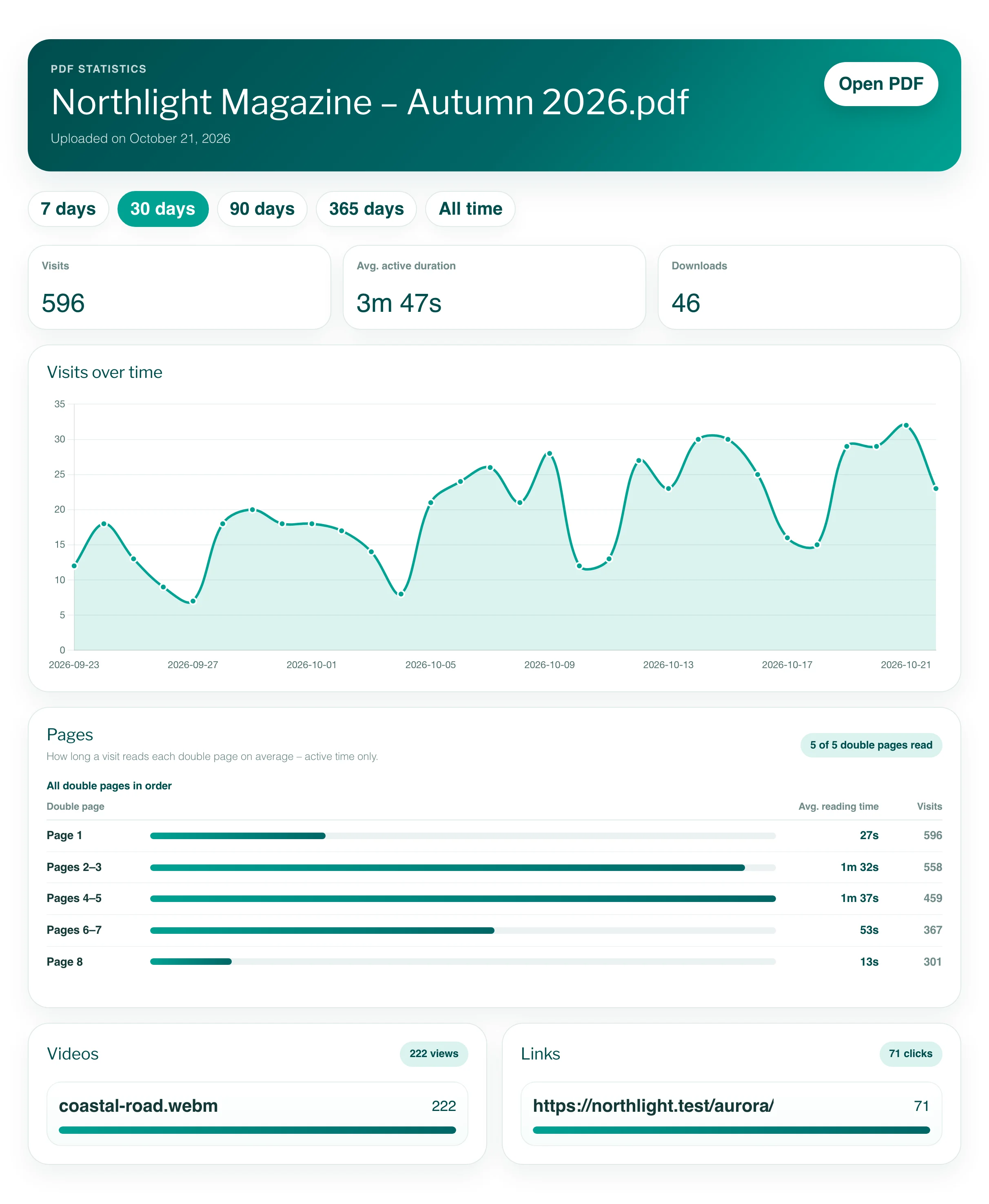
Choose Statistics in a project’s menu to see its visits over time, the average active reading time – also per page –, downloads and how often readers used its videos, audio, 3D models, slideshows, click dummies and links.
Viewnamic counts how each publication is read: visits, active reading time – in total and per page –, downloads and how readers use its videos, audio, links and other content. You find the figures under Statistics in the project’s menu in the Workspace; your public page has statistics of its own.
Statistics are included in the Premium and Tailored plans – see Pricing.
Open the statistics of a publication
- Open the Workspace.
- Open the project menu (⋯) on the project’s tile and choose Statistics.
- Choose the period: 7 days, 30 days, 90 days, 365 days or All time. The page starts with 7 days. A period always ends today: 7 days are today and the six days before.
What the figures mean
| Figure | What it counts |
|---|---|
| Visits | How often the publication was opened in the viewer – through its link, a secure link or an embed on a website. |
| Avg. active duration | The average reading time per visit. Only active time counts: a tab in the background counts nothing, and without any activity the count stops after a short while. |
| Downloads | How often readers downloaded the PDF, if your plan includes PDF download. |
| Custom page clicks | Clicks on your logo in the viewer’s top bar, which opens the link from your viewer design. |
| Visits over time | A chart of the visits per day. |
Reading time per page
The Pages panel shows for each page how many visits read it (Visits) and how long such a visit read it on average (Avg. reading time). The bar compares each page with the longest-read one.
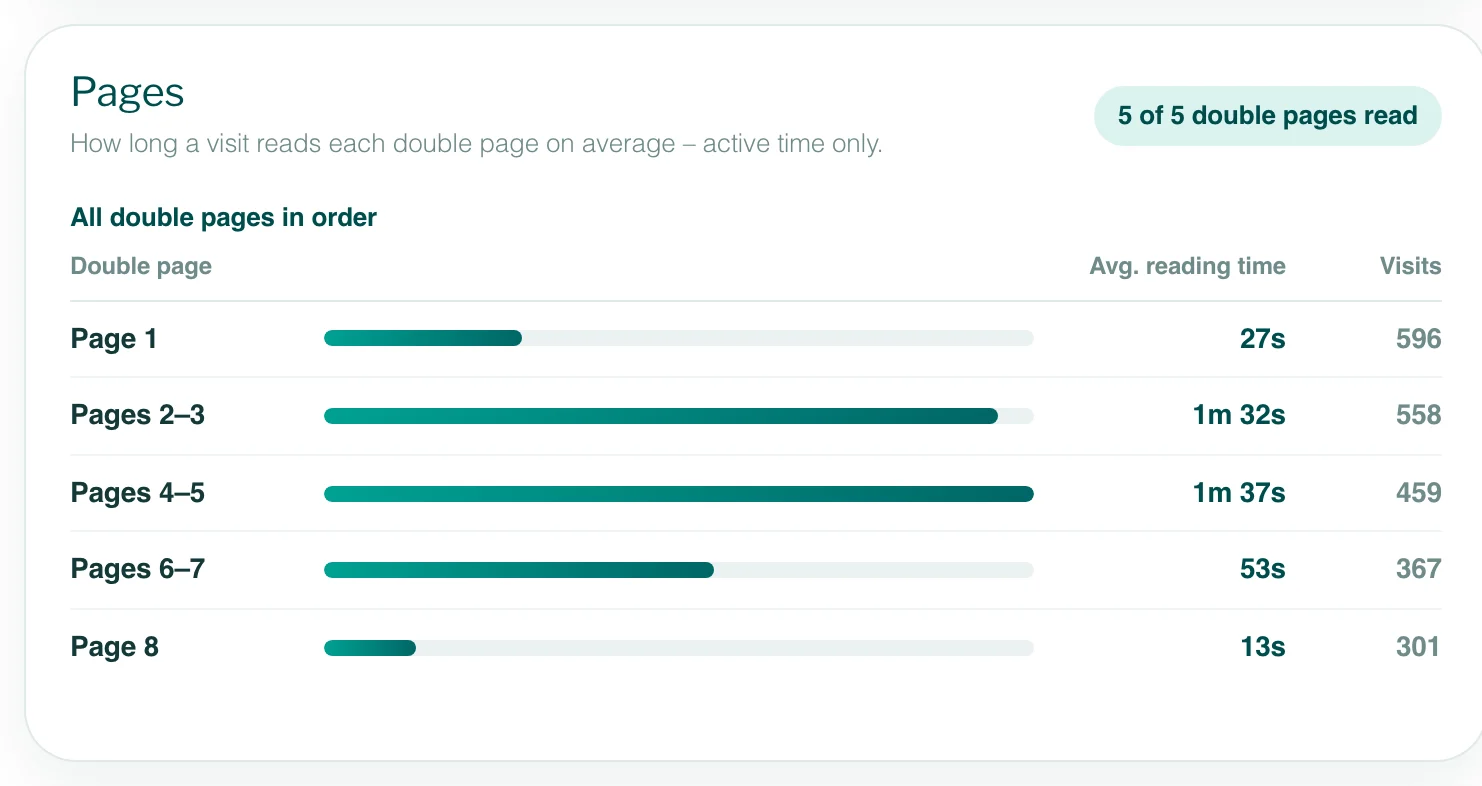
- Double pages: a publication that opens in the Magazine view is counted by double page – page 1 (the cover) alone, then pages 2–3, 4–5 and so on – because readers see two pages side by side and their time cannot be split between them. With an even number of pages, the last page stands alone too. A reader on a phone, which shows one page at a time, counts for that page’s double page.
- Only active time counts, as for the average active reading time. A page counts once per visit, however often the reader comes back to it; a page that was on screen for less than about a second does not count.
- Time in the Grid view and in the Reading Mode counts for the visit, not for a page.
- Up to 10 pages, the panel lists every page in order. A longer document starts with its 10 longest-read pages; the button below the list shows every page in order – pages nobody read in the period with 0 visits.
- Reading time per page is counted since it was introduced in the statistics; if your period starts earlier, the panel names the day.
Interactive content
For each kind of content that readers used, a panel lists the elements with their number and a bar to compare them:
- Videos: views – a reader started the video.
- Audio: plays.
- 3D Models, Click Dummies and Slideshows: views – a reader opened the element.
- Links: clicks on link areas.
Each element counts at most once per visit: a reader who plays a video three times adds one view. Figures and panels appear as soon as there is something to count in the chosen period.
Statistics of your public page
Under Public Overview Design, Public Page statistics shows how readers use the public page of the active profile. It starts with 30 days.
- Visits: how often readers came to the page from elsewhere – moving on to its further pages or collections, or reloading it, does not count as a new visit. Page views: how often it was loaded in total.
- Publication impressions: how often publication cards were shown on screen.
- Publication opens: clicks on a card. Viewer opens: how often the publication then opened in the viewer.
- A table of your publications with Status, impressions, opens, viewer opens and Open rate – the share of impressions that led to an open.
The public page statistics need a plan with both statistics and a public page. More about the page: The public page.
Good to know
- Your own visits count like any reader’s. The preview in the Embed PDF window and the live examples on the Viewnamic website are not counted.
- Readers whose browser sends Do Not Track or Global Privacy Control are not counted – see Reader statistics and privacy.
- Statistics are deleted after 12 months, so All time covers the last 12 months at most.
- In a team, you see statistics if your role allows it – see Team members.
Questions
Can I see who read my publication?
No. The statistics show how a publication is read, not who reads it. Only with secure sharing do you see when each recipient opened their personal link.
Does a reader who comes from my public page count twice?
The reader counts once as a visit of the publication. On your public page, the same click also counts as a publication open and a viewer open.
Why does the Pages panel show double pages?
Your publication opens in the Magazine view, where readers see two pages side by side. Their reading time cannot be split between the two pages, so each double page counts as one.
Why does a page have fewer visits than the publication?
Not every reader reaches every page. A page counts the visits that had it on screen for at least about a second – so the numbers usually fall towards the end of a document.