

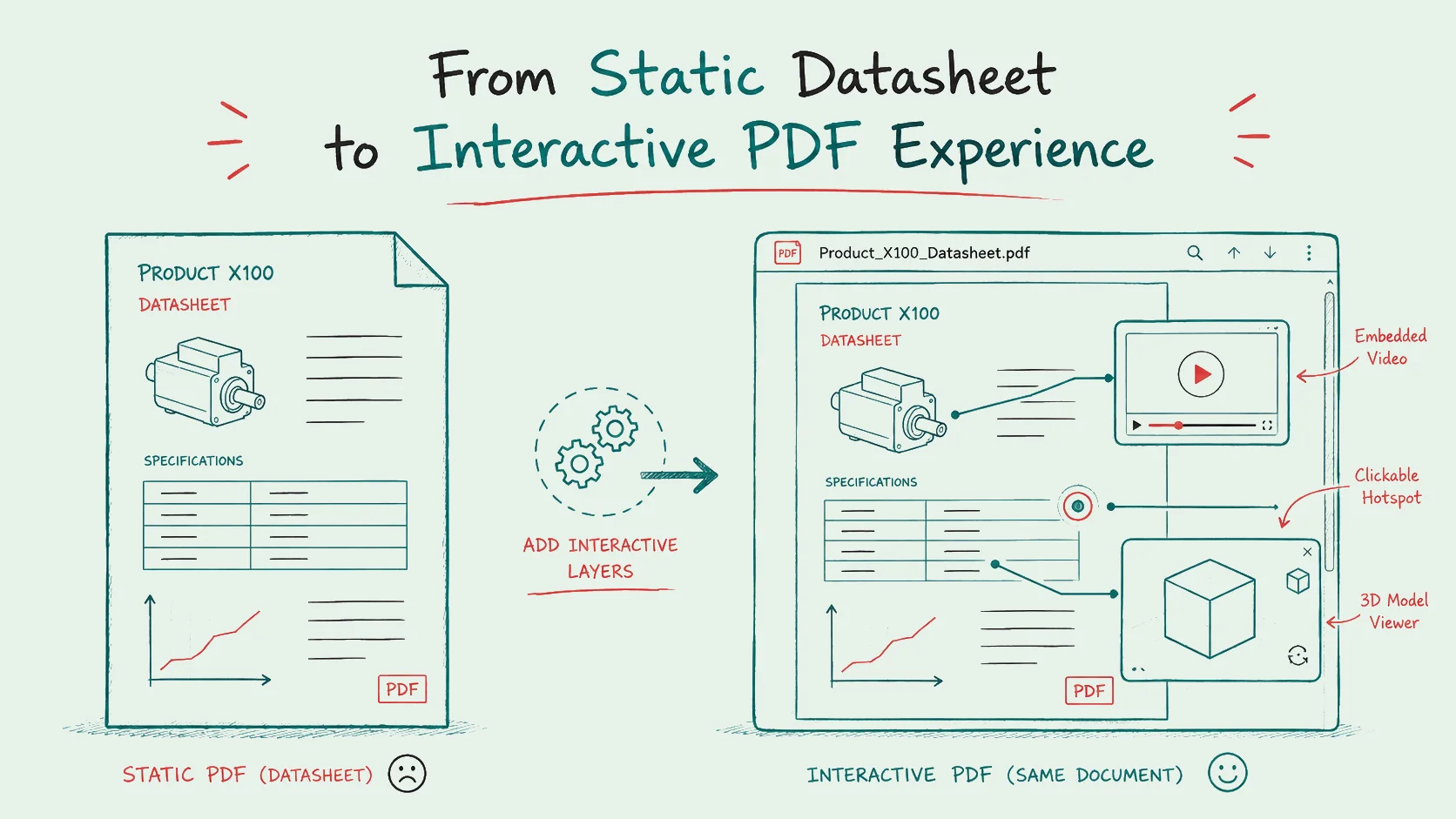
Technical datasheets are essential because they give buyers the product information they need. However, a static PDF often cannot show how a product works in practice. That is why many companies need more than a document with specifications. They need an interactive product experience that helps customers understand, compare and trust a product faster.
With Viewnamic, you can turn an existing technical datasheet into an interactive PDF experience. Instead of replacing the document with a website, Viewnamic keeps the PDF at the center and adds dynamic content directly on top of it. As a result, your datasheet becomes more visual, more useful and more engaging without losing its original structure.
Why Technical Datasheets Still Matter
Technical datasheets remain one of the most important assets in product communication. Engineers, purchasers, sales teams, distributors and customers rely on them because they provide structured and reliable information.
A strong technical datasheet usually includes:
• Product specifications
• Technical dimensions
• Application areas
• Material information
• Safety and compliance details
• Product images
• Performance data
• Installation or usage instructions
In many cases, the datasheet is still the first document a buyer opens when they want to evaluate a product. Therefore, it should not only inform. It should also help the reader understand the product quickly.
The problem is not the datasheet itself. Instead, the problem is that the way people consume information has changed.
Today, your audience expects visual explanations, intuitive interaction and instant clarity. A purely static PDF can feel limited when the product is complex, visual or difficult to explain with text alone.
The Gap Between Static Information and Product Understanding
A technical datasheet can tell your audience what a product does. However, it often cannot show how the product works.
Because of this, a gap appears between information and understanding. A potential customer may see the specifications, but still struggle to imagine the product in use. They may understand the dimensions, but not the actual scale. In addition, they may read the installation steps, but still have questions.
This matters because confusion slows down sales.
When buyers do not fully understand your product, they hesitate. In many cases, they ask for additional calls, request more material or delay the decision. Sometimes, they simply choose a competitor whose product communication feels clearer.
An interactive product experience helps close this gap. More importantly, it makes your product easier to understand without forcing your audience to leave the document.
What Is an Interactive Product Experience?
An interactive product experience is a digital product presentation that goes beyond static text and images. It allows your audience to explore product information in a more visual, intuitive and engaging way.
Instead of only reading about a product, users can interact with helpful content directly inside the document experience. For example, they can watch a product video, inspect a 3D model or click on a hotspot for additional context.
Examples of interactive product content
You can enhance a technical datasheet with:
• Product videos that explain key features or show the product in action
• 3D models that allow users to inspect the product from different angles
• Interactive demos that demonstrate software or product workflows
• Clickable prototypes that simulate user journeys
• Animated visuals that explain technical processes
• Embedded contact elements that support lead generation
• Analytics tracking that shows how people engage with your content
As a result, your datasheet becomes more than a passive document. It becomes an active sales and education tool.
From PDF Datasheet to Interactive PDF Experience
Many companies already have valuable product PDFs. However, these documents are usually static. Rebuilding them as websites, microsites or product portals can be expensive and time consuming.
Viewnamic offers a different approach.
With Viewnamic, you upload your existing PDF and place dynamic content on selected areas of the document. The original PDF file remains unchanged. At the same time, the interactive content appears in the Viewnamic Web Viewer as a layer directly on top of the PDF.
This means your datasheet keeps its familiar structure, but gains the impact of modern digital content.
Why this approach is powerful
You do not need to replace your product documentation. Instead, you can enhance it.
That makes the process faster, more flexible and easier to implement. Your sales team can continue using familiar PDF assets. Meanwhile, your customers experience a more engaging and informative product presentation.
In short, Viewnamic does not turn your datasheet into a separate website. It makes the PDF itself feel interactive.
How Interactive Datasheets Improve Product Communication
Interactive datasheets can improve communication across the entire customer journey. They help prospects understand the product faster, support sales conversations and make technical information easier to absorb.
1. Complex products become easier to understand
Some products cannot be explained effectively through text alone. Machines, components, software solutions, real estate products, industrial equipment and technical services often need visual context.
For example, a short video can explain a feature in seconds. A 3D model can make a physical product easier to inspect. In addition, a clickable hotspot can guide the reader to the most important details.
This is especially valuable when your audience includes both technical and non technical decision makers.
2. The product experience becomes more memorable
People remember visual and interactive content more easily than static text. Therefore, an interactive datasheet can make your product communication more memorable.
Rather than only reading about your product, users can explore it. This creates a stronger experience and helps your brand stand out in competitive markets where many datasheets look similar.
3. Buying decisions become easier
A buyer who understands your product clearly is more likely to move forward. Interactive content can answer common questions directly inside the datasheet.
As a result, your audience gets more clarity without switching between documents, videos, links and separate web pages. This reduces friction and supports faster decisions.
4. Sales teams get stronger material
Sales teams often rely on PDFs during outreach, meetings and follow ups. However, a static PDF can feel limited when a product needs explanation.
An interactive datasheet gives sales teams a stronger asset. They can share one link that combines technical information, visual explanation and interactive elements in one focused experience.
This helps your sales team present the product more clearly and professionally.
5. Engagement becomes measurable
Traditional PDFs often disappear after being sent. You may not know whether someone opened the file, which sections they viewed or what content interested them most.
With Viewnamic, interactive product experiences can provide engagement insights. Because of this, you can better understand how your audience interacts with your product content.
These insights can help you improve sales material, optimize product communication and identify what your buyers care about most.
Use Cases for Interactive Product Datasheets
Interactive product datasheets are useful across many industries and formats. They are especially effective when products are complex, visual or explanation heavy.
Industrial products and manufacturing
Manufacturers can use interactive datasheets to show machines, components, technical systems or production processes more clearly.
For instance, a 3D model can help customers inspect product details. A video can demonstrate installation, maintenance or real world usage. In addition, clickable markers can explain important features directly on the product image.
Real estate and construction
Real estate exposés, construction documentation and product brochures can benefit from embedded videos, virtual tours or 3D visualizations.
Instead of only viewing floor plans and images, users can experience a property or product in a richer digital format. This makes the document more engaging while keeping the PDF structure intact.
Software and digital products
Software companies can turn product PDFs into interactive sales assets by embedding walkthrough videos, clickdummies or clickable prototypes.
This makes it easier to demonstrate user flows without requiring a live demo every time. At the same time, the PDF remains a clear and structured sales document.
Sales brochures and product catalogs
Product catalogs often contain many items and specifications. However, not every product can be explained well with static images and short descriptions.
Interactive elements can highlight selected products, show feature videos or guide users toward the most relevant offer. As a result, the catalog becomes more useful for both marketing and sales.
HR, portfolios and presentations
Interactive PDFs are not limited to technical products. They can also support resumes, portfolios, pitch materials and corporate presentations.
In these cases, dynamic content helps tell a stronger story. For example, a portfolio can include project videos, while a pitch deck can include product demos or clickable prototypes.
Why Viewnamic Is Different From Traditional PDF Solutions
There are already ways to add multimedia to documents. However, many approaches are either technically limited, difficult to use or disruptive to the natural PDF experience.
Viewnamic focuses on a simple idea:
Your PDF stays familiar, but the experience becomes dynamic.
The original PDF file is not modified. Instead, dynamic content is placed over the PDF in the Viewnamic Web Viewer. This creates the impression that videos, 3D models or clickable elements are naturally part of the document.
The key advantages
• You can keep using existing PDF assets
• You do not need to rebuild your content from scratch
• The reading experience remains natural and browser based
• Dynamic content can be added flexibly
• The viewer can match your brand
• Engagement statistics help you understand user behavior
Because of this, Viewnamic is especially valuable for companies that already rely heavily on PDF based communication but want to modernize the way their content is experienced.
How To Turn a Technical Datasheet Into an Interactive Product Experience
You do not need to make every part of your datasheet interactive. In practice, the goal is to enhance the moments where additional context creates real value.
Step 1: Identify where users need more clarity
Start by looking at your datasheet from the reader’s perspective.
Ask yourself:
• Which product features are difficult to explain with text alone?
• Where do customers usually ask follow up questions?
• Which visuals would make the product easier to understand?
• Which section has the strongest impact on a buying decision?
These are the best places to add interactive content.
Step 2: Choose the right dynamic content
Different content types serve different purposes.
Use videos when you want to explain a feature, show a product in action or guide users through a process.
Use 3D models when your product is physical, spatial or design driven.
Use clickable prototypes when you want to demonstrate software, interfaces or workflows.
Use interactive elements when you want to guide users toward contact, booking or deeper product exploration.
By choosing the right format for each section, you make the datasheet more helpful without overloading the reader.
Step 3: Place content naturally inside the PDF experience
The interactive content should feel like it belongs in the document. It should support the main information instead of distracting from it.
With Viewnamic, you can select areas within the PDF and place dynamic content exactly where it adds value. For example, a product video can sit next to a product image. A 3D model can appear near the technical drawing. A clickable hotspot can explain a specific feature directly on the page.
This keeps the reading experience natural while making the document more useful.
Step 4: Share the interactive datasheet as a digital link
Instead of sending only a static PDF attachment, you can share an interactive version through the Viewnamic Web Viewer.
This makes the datasheet easier to access, more engaging to explore and more valuable for digital sales conversations. At the same time, the PDF remains the foundation of the experience.
Step 5: Analyze engagement and improve the experience
Once users interact with your content, analytics can help you understand what works.
You can learn which assets attract attention, which sections generate interest and where your audience engages most. Based on these insights, you can improve future product communication and create stronger sales material.
SEO and Sales Benefits of Interactive Product Content
Interactive product experiences are not only useful for customers. They can also support your broader digital marketing and sales strategy.
When your product communication becomes more engaging, you can create better landing pages, stronger outbound campaigns and more persuasive follow up material.
Benefits for marketing
• More engaging digital product content
• Better storytelling around technical products
• Stronger visual differentiation from competitors
• Reusable assets for campaigns and sales enablement
• More measurable interaction data
Benefits for sales
• Clearer product explanations
• Fewer repetitive clarification calls
• Better follow up material after meetings
• More professional product presentations
• Higher confidence during buying decisions
In short, an interactive datasheet can become more than documentation. It can become a conversion focused sales asset.
The Future of Product Documentation Is Interactive
Static PDFs will not disappear. They are too useful, too established and too practical.
However, the way people experience PDFs is changing.
Modern buyers expect product information to be clear, visual and easy to explore. They want the reliability of a technical datasheet combined with the richness of a digital product experience.
This is exactly the bridge Viewnamic creates.
You can preserve the structure and trust of your existing PDF while adding the interactivity your audience expects from modern digital content.
Turn Your Technical Datasheet Into an Interactive Product Experience
A technical datasheet should do more than list product information. It should help your audience understand your product, trust your expertise and take the next step.
By adding videos, 3D models, clickable hotspots and interactive elements, you can transform a static PDF into a powerful interactive product experience.
With Viewnamic, this transformation becomes simple. You keep your existing PDF, enhance it with dynamic content and share it through a customizable web viewer that feels natural for your audience.
Ready to make your product documents more engaging? Turn your next technical datasheet into an interactive product experience with Viewnamic.