Interactive PDF Comparison: Why Viewnamic Beats Adobe and Flipbooks
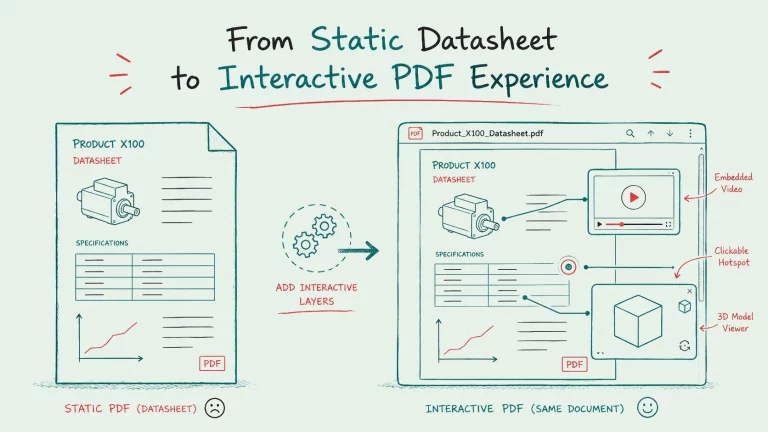
Adding video to a PDF usually means huge files or a viewer that can only flip pages. We compare Adobe Acrobat, flipbooks and Viewnamic to show how to embed video and 3D content in a fast, natural reading experience.

Adding videos, 3D models, or interactive elements to a PDF sounds simple. However, the tools you choose make a huge difference in practice. Some solutions focus on file-based media, while others turn documents into online presentations. To deliver interactive content without hurting the user experience or file size, you should compare the main options carefully.
In this article, we compare Viewnamic, Adobe Acrobat Pro, and flipbook platforms such as Issuu, FlipHTML5, Yumpu, and Flipsnack. You will discover where each solution shines and why the best choice depends on how your audience actually reads your documents.
Adobe Acrobat Pro: A Classic Approach to Interactive PDFs
Adobe Acrobat Pro remains a well-known option for enriching PDFs with videos or 3D content.
What Adobe Acrobat Pro does well
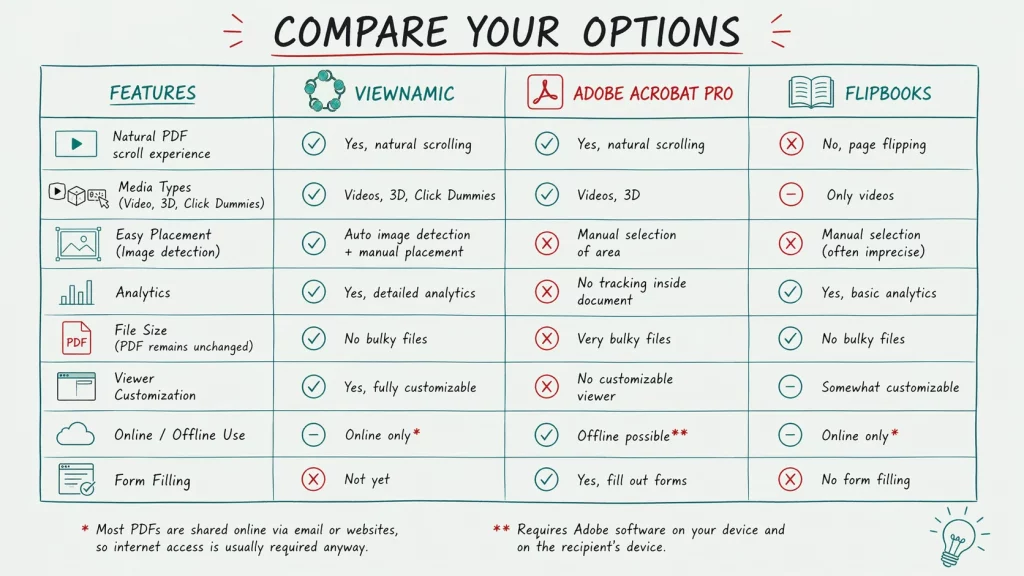
Acrobat Pro allows you to place videos and 3D content directly into the PDF. In some cases, this supports offline use, which helps when a document needs to be viewed without a constant internet connection. The software also keeps the classic PDF experience intact. Readers can scroll through the document naturally, fill out forms, and edit certain PDF content. For workflows that rely on traditional document handling, these features remain valuable.
Where Adobe Acrobat Pro becomes limited
The biggest problem is accessibility. Both you and the document recipient usually need Adobe software for the interactive content to work properly. That is a serious limitation, especially on mobile devices, where many iPhone users do not use Adobe Reader. In practice, this means the video or interactive content may not appear at all for part of your audience.
There is also the file size problem. A PDF is normally valued because it is compact and easy to share. Once you begin embedding videos and other rich media directly into it, the document can become much heavier. That reduces one of the biggest advantages of the PDF format in the first place. Furthermore, you can expect long loading times and laggy scrolling. This often frustrates readers who expect a smooth, modern document experience.
Another issue is the manual process. You must define the exact area where the video or interactive element should appear. That can be time consuming and imprecise, especially if you work with many documents.
On top of that, Acrobat does not give you a customizable viewer experience, and tracking inside the document is very limited. If you want to know how users interact with your content, Acrobat is not the strongest choice.
Flipbooks like Issuu, FlipHTML5, Yumpu, and Flipsnack
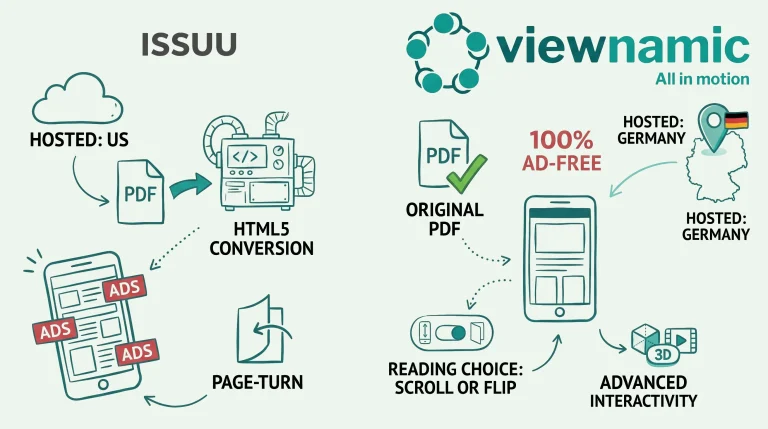
Flipbook tools like Issuu, FlipHTML5, Yumpu and Flipsnack took a different path. Instead of changing the PDF itself, they usually turn it into an online viewing experience that looks like a digital magazine or brochure.
What flipbooks do well
Flipbook platforms solve one important issue: the PDF file itself does not become bulky. Since the content is usually displayed in an online viewer, you can add videos without returning a huge file to the user.
They also often provide analytics, so you can see how the document is used. For marketing teams, this can be a real advantage because you get at least some visibility into views and engagement.
The viewer itself can also be customized to some extent, which is helpful when you want a more branded presentation.
Where flipbooks fall short
The biggest drawback is that flipbooks only work online. That may sound acceptable at first, but it changes the whole document experience. A PDF is often shared by email or downloaded from a website, which already assumes internet access at the point of delivery. Still, there are use cases where a user needs to upload a file themselves or use it in a more offline centered workflow. In those cases, an online only solution can be a problem.
The user experience is also not ideal. Fliping pages digitally may have felt exciting years ago, but today it often feels more like a gimmick than a real usability advantage. People are used to scrolling. On mobile especially, scrolling is faster, more natural, and more comfortable than flipping page by page.
Another limitation is content variety. Most flipbooks are designed mainly for videos. That means you usually cannot include richer media such as 3D models or click dummies. Manual placement of media can also be inaccurate, which makes production harder and results less polished.
And unlike a traditional form enabled PDF, flipbooks are generally not designed for form filling.
Why Viewnamic offers a stronger balance
We built Viewnamic for teams that want the strengths of PDF documents without the usual technical weaknesses. See a science paper as an example here.
A natural PDF viewing experience
Viewnamic maintains a natural scrolling experience. This matters more than many people think. Your audience already knows how to scroll through digital content from browsing websites and social feeds. Even small children at the age of two nowadays naturally scroll on screens, which shows how intuitive this motion is to humans. You do not have to force your audience into a page-flipping interface or ask them to install special software.
A customizable viewer
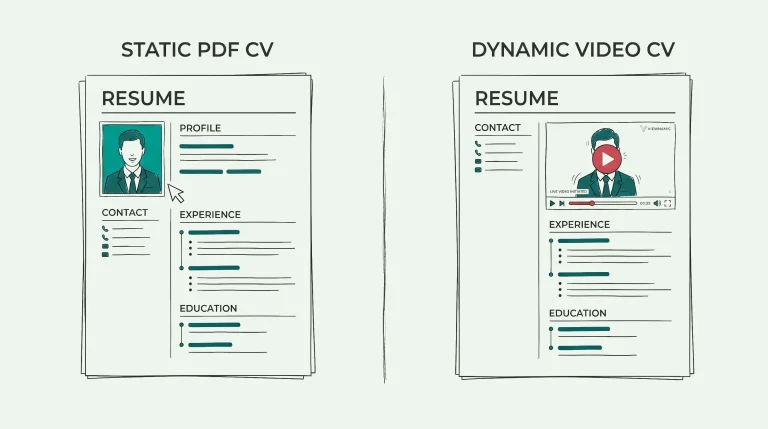
Unlike standard PDF tools, Viewnamic gives you a customizable viewer. That means the reading experience can match your brand and your use case much better. For marketing, sales, recruiting, or portfolio use, this is often a decisive advantage.
More than just video
Our platform does not limit you to video. You can include videos, 3D content, and click dummies. This opens the door to much richer document experiences than traditional PDF workflows can provide.
Smarter placement of content
Another practical advantage is the automated placement. Viewnamic can detect images inside the document and replace them with video. This makes the workflow faster and more precise, especially for documents with many visual elements.
Analytics without changing the PDF
Viewnamic provides detailed analytics so you can understand how people engage with your document. At the same time, the original PDF remains unchanged. This keeps the source file clean, lightweight, and easy to manage.
The trade offs and why they are often acceptable
No solution is perfect, and Viewnamic is no exception.
Online only use
Viewnamic currently works online only. In many situations, this is not a real disadvantage. Most PDFs are already sent by email, shared via links, or accessed on a website. In all of these cases, the user already needs internet access at some point to receive or open the document.
The limitation matters more when someone must upload a document in a strict offline or closed environment. In those cases, an online viewer may not be the best fit. Still, for the majority of modern use cases, the online approach is a practical and reasonable trade off, especially because it avoids bulky files and software compatibility issues.
Form filling is not available yet
We do not support form filling yet. For some industries, that matters. If you core requirement is form completion, you might still need a traditional PDF workflow. But for sales materials, portfolios, and real estate brochures, the gains in usability usually outweigh this limitation.
Which solution should you choose
The right choice depends on what you need most.
Use Adobe Acrobat Pro if you need traditional PDF editing, form handling, and offline rich media support, and you can accept the software dependency and very bulky files.
Use flipbooks if you mainly want an online marketing viewer with analytics and basic video integration. If you like the page-flip effect, this may be the right choice for you. However, if you want to include more than just videos and prefer a natural digital reading experience for your audience, flipbooks are likely not the best fit.
Use Viewnamic if you want the best balance of a natural reading experience, a customizable viewer, rich media support, and analytics, while keeping the original PDF unchanged.
The Verdict: Our Interactive PDF Comparison Results
Interactive content should not hurt usability. A good solution feels natural, works across devices, and keeps the document lightweight.
That is where Viewnamic stands out. Compared with Adobe Acrobat Pro and classic flipbook tools, it combines the strengths of PDF communication with a modern, flexible online experience. If you want to create documents that look professional and go beyond static pages, Viewnamic is the alternative you need.
If you want to create documents that look professional, feel intuitive, and go beyond static pages, Viewnamic is a strong alternative worth considering.
Publish your PDFs with Viewnamic
Host, share and enhance your documents – free for 30 days.